
Appearance
How to choose who can access a client
By default, everyone at your agency can work in every client's account. If you'd rather keep a client to the people who work on it, you can limit access to selected people.
Only agency owners can change who has access.
Change who has access
- Go to Clients.
- Click the ⋯ menu on the client's card and choose Manage access.
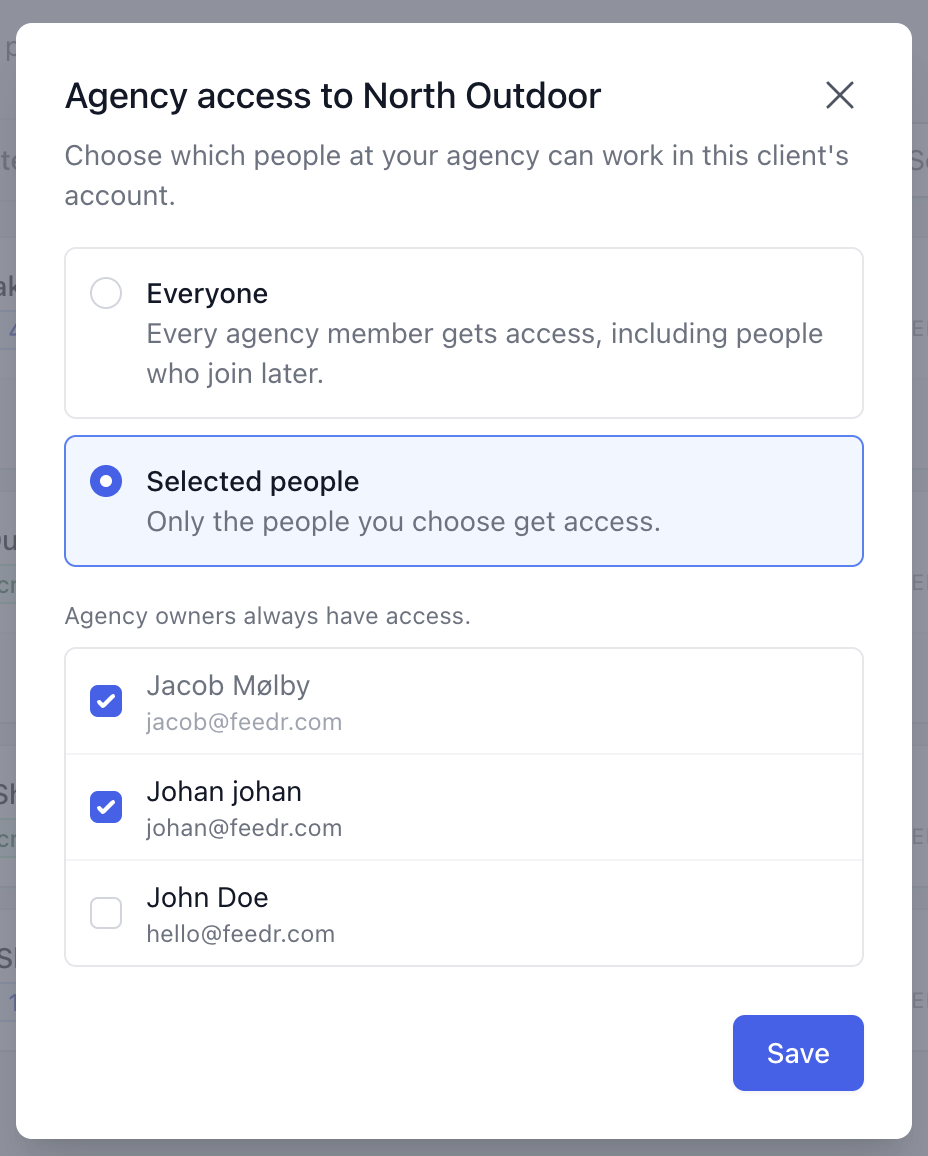
- Choose one of the options:
- Everyone: every agency member gets access, including people who join later.
- Selected people: only the people you choose get access.
- If you chose Selected people, tick the people who should have access.
- Click Save.
The client's card shows who has access, for example Everyone, Owners only or the names of the people you chose.
INFO
Agency owners always have access to every client, so they're always ticked.
If you choose Selected people without ticking anyone, only agency owners will have access to the client.
When people join or leave your agency
- With Everyone, new agency members get access to the client automatically.
- With Selected people, new members don't get access until an owner adds them.
- When someone leaves your agency, they lose access to all clients right away and are removed from every client's list. If they rejoin later, add them again.
What the client sees
The client can see which of your people have access through the agency connection. People with access through your agency are marked with an Agency badge on the client's Users page.